################################mysql
主备数据库
http://www.cnblogs.com/hustcat/archive/2009/12/19/1627525.html
SET PASSWORD FOR ‘root’@’localhost’ = PASSWORD(‘ceshi160’);
GRANT REPLICATION SLAVE, REPLICATION CLIENT ON . TO repl@’192.168.0.%’ IDENTIFIED BY ‘ceshi160’;
grant all privileges on cmm.* to ‘cmmw’@’192.168.0.%’ identified by ‘cmmw123’;
grant select on cmm.* to ‘cmmr’@’192.168.0.%’ identified by ‘cmmr123’;
flush privileges;
grant select on . to ‘monitor’@’192.168.30.21’ identified by ‘monitor’;
flush privileges;
grant all privileges on . to ‘monitor’@’192.168.30.21’ identified by ‘monitor’;
flush privileges;
Starting MySQL (Percona Server). ERROR! The server quit without updating PID file (/data/mysqldata/localhost.localdomain.pid).
google了下 ,问题可能的原因有多种,具体什么原因最好的办法是先查看下错误日志:
1.可能是/usr/local/mysql/data/rekfan.pid文件没有写的权限
解决方法 :给予权限,执行 “chown -R mysql:mysql /var/data” “chmod -R 755 /usr/local/mysql/data” 然后重新启动mysqld!
2.可能进程里已经存在mysql进程
解决方法:用命令“ps -ef|grep mysqld”查看是否有mysqld进程,如果有使用“kill -9 进程号”杀死,然后重新启动mysqld!
3.可能是第二次在机器上安装mysql,有残余数据影响了服务的启动。
解决方法:去mysql的数据目录/data看看,如果存在mysql-bin.index,就赶快把它删除掉吧,它就是罪魁祸首了。本人就是使用第三条方法解决的 !http://blog.rekfan.com/?p=186
4.mysql在启动时没有指定配置文件时会使用/etc/my.cnf配置文件,请打开这个文件查看在[mysqld]节下有没有指定数据目录(datadir)。
解决方法:请在[mysqld]下设置这一行:datadir = /usr/local/mysql/data
5.skip-federated字段问题
解决方法:检查一下/etc/my.cnf文件中有没有没被注释掉的skip-federated字段,如果有就立即注释掉吧。
6.错误日志目录不存在
解决方法:使用“chown” “chmod”命令赋予mysql所有者及权限
7.selinux惹的祸,如果是centos系统,默认会开启selinux
解决方法:关闭它,打开/etc/selinux/config,把SELINUX=enforcing改为SELINUX=disabled后存盘退出重启机器试试。
mysql MYI文件丢失如何修复 [复制链接]
MYI 文件是索引文件,这个文件即使是删除了,还可以根据MYD以及frm文件来恢复。
所以,当你备份数据库时,如果想省空间,那么就去掉*MYI吧。
MYI恢复可以这样操作:
首先进入mysql命令行
执行命令
mysql> repair table tablename USE_FRM;
复制代码
这样就可以恢复MYI文件了。
mysql Copying to tmp table 慢
哦,原来是这样的,如果查询超出了tmptablesize的限制,那么mysql用/tmp保存查询结果,然后返回给客户端。
set global tmptablesize=509715200 (500M)
mysql 卡死 大部分线程长时间处于sending data的状态
把query_cache减小到默认值 16M,把一些不怎么变动的数据,做了静态化。惊奇的发现,12天过去了,没再出过问题……
修复表
mysql> REPAIR TABLE mytable;
命令来修复
mysqlcheck -A -r -c -p
主站注册问题
grant all privileges on livehelp_host.* to ‘flashchat’@’216.158.78.234’ identified by ‘dj7ad62zz’;
ERROR 1201 (HY000): Could not initialize master info structure; more error messages can be found in the MySQL error log
在另外一台上执行也是一样提示这个错误。 网上查了一些资料,发现大概有两种方法解决这个问题,1.是清理mysql的相关日志;2.是reset slave ;但是清理日志的方法有点复杂,使用第2种方法比较方便。
mysql> slave stop;
mysql> reset slave;
mysql> change master to masterhost=’172.17.2.10′,masteruser=’sync’,masterpassword=’123456′,masterlogfile=’updatelog.000004′,masterlog_pos=106;
mysql> slave start;
另外一台也按照这种方法执行,轻松搞定。配置完成查看mysql主从同步状态正常!
‘Could not find first log file name in binary log index file’ from master when reading data from binary log
因为同步的bin-log 有问题
先停止slave 的 同步
stop slave;
查看主库的状态
show master status;
flush logs;
再次 show master status;
mysql> mysql> show master status;
+——————+———-+—————+——————+
| File | Position | BinlogDoDB | BinlogIgnoreDB |
+——————+———-+—————+——————+
| mysql-bin.000256 | 284 | 123flashchat4 | |
+——————+———-+—————+——————+
1 row in set (0.00 sec)
从库 根据这个信息去同步
CHANGE MASTER TO MASTER_HOST=’216.158.73.10′,
MASTER_USER='repl',

MASTER_PASSWORD='topcmm888',

MASTER_LOG_FILE='mysql-bin.000256',
MASTERLOGPOS=284;
show slave status G
即可
显示详细信息
show variables;
操作日志:
http://www.cnblogs.com/cocos/archive/2010/12/22/1913557.html
mysql 解决一个奇怪的问题,详见正文 2013-05-09 10:23:17
分类: Mysql/postgreSQL
错误日志报错如下:
130508 16:30:53 mysqldsafe Starting mysqld daemon with databases from /data/mysql
130508 16:30:54 [Warning] The syntax ‘–log-slow-queries’ is deprecated and will be removed in a future release. Please use ‘–slow-query-log’/’–slow-query-log-file’ instead.
130508 16:30:54 InnoDB: The InnoDB memory heap is disabled
130508 16:30:54 InnoDB: Mutexes and rwlocks use GCC atomic builtins
130508 16:30:54 InnoDB: Compressed tables use zlib 1.2.3
130508 16:30:54 InnoDB: Initializing buffer pool, size = 500.0M
130508 16:30:54 InnoDB: Completed initialization of buffer pool
130508 16:30:54 InnoDB: highest supported file format is Barracuda.
InnoDB: Log scan progressed past the checkpoint lsn 27219795678
130508 16:30:54 InnoDB: Database was not shut down normally!
InnoDB: Starting crash recovery.
InnoDB: Reading tablespace information from the .ibd files…
InnoDB: Restoring possible half-written data pages from the doublewrite
InnoDB: buffer…
InnoDB: Doing recovery: scanned up to log sequence number 27219928522
InnoDB: Error: tried to read 16384 bytes at offset 0 3473408.
InnoDB: Was only able to read 8192.
InnoDB: Fatal error: cannot read from file. OS error number 17.
130508 16:31:05 InnoDB: Assertion failure in thread 47198419330368 in file os0file.c line 2523
InnoDB: We intentionally generate a memory trap.
InnoDB: Submit a detailed bug report to http://bugs.mysql.com.
InnoDB: If you get repeated assertion failures or crashes, even
InnoDB: immediately after the mysqld startup, there may be
InnoDB: corruption in the InnoDB tablespace. Please refer to
InnoDB: http://dev.mysql.com/doc/refman/5.5/en/forcing-innodb-recovery.html
InnoDB: about forcing recovery.
08:31:05 UTC – mysqld got signal 6 ;
This could be because you hit a bug. It is also possible that this binary
or one of the libraries it was linked against is corrupt, improperly built,
or misconfigured. This error can also be caused by malfunctioning hardware.
We will try our best to scrape up some info that will hopefully help
diagnose the problem, but since we have already crashed,
something is definitely wrong and this may fail.
keybuffersize=16777216
readbuffersize=1048576
maxusedconnections=0
maxthreads=500
threadcount=0
connectioncount=0
It is possible that mysqld could use up to
keybuffersize + (readbuffersize + sortbuffersize)*maxthreads = 1046083 K bytes of memory
Hope that’s ok; if not, decrease some variables in the equation.
Thread pointer: 0x0
Attempting backtrace. You can use the following information to find out
where mysqld died. If you see no messages after this, something went
terribly wrong…
stackbottom = 0 threadstack 0x40000
/usr/local/mysql/bin/mysqld(myprintstacktrace+0x2e)[0x76a3ee]
/usr/local/mysql/bin/mysqld(handlefatalsignal+0x386)[0x655046]
/lib64/libpthread.so.0[0x3fade0ebe0]
/lib64/libc.so.6(gsignal+0x35)[0x3fad630265]
/lib64/libc.so.6(abort+0x110)[0x3fad631d10]
/usr/local/mysql/bin/mysqld[0x85bfc4]
/usr/local/mysql/bin/mysqld[0x822641]
/usr/local/mysql/bin/mysqld[0x801597]
/usr/local/mysql/bin/mysqld[0x801a4f]
/usr/local/mysql/bin/mysqld[0x7f4240]
/usr/local/mysql/bin/mysqld[0x7c5c40]
/usr/local/mysql/bin/mysqld[0x7c5fa2]
/usr/local/mysql/bin/mysqld[0x7c7727]
/usr/local/mysql/bin/mysqld[0x7b61b6]
/usr/local/mysql/bin/mysqld[0x78787a]
/usr/local/mysql/bin/mysqld(Z24hainitializehandlertonP13stpluginint+0x41)[0x657231]
/usr/local/mysql/bin/mysqld[0x56714b]
/usr/local/mysql/bin/mysqld(Z11plugininitPiPPci+0xa42)[0x567d12]
/usr/local/mysql/bin/mysqld[0x4f21b2]
/usr/local/mysql/bin/mysqld(Z11mysqldmainiPPc+0x865)[0x4f4ec5]
/lib64/libc.so.6(libcstartmain+0xf4)[0x3fad61d994]
/usr/local/mysql/bin/mysqld[0x4ed769]
The manual page at http://dev.mysql.com/doc/mysql/en/crashing.html contains
information that should help you find out what is causing the crash.
130508 16:31:05 mysqldsafe mysqld from pid file /data/mysql/log/scaner.pid ended
解决办法:
删除掉
ibdata* ,
ib_logfile* ,
所有的日志。 (这个可以不删除)
重启后可启动数据库,因数据库是非正常关闭引起的。所有会造成数据丢失。 要做好备份工作
备库同步时一直报错
只要主库 有修改 ,备库就会报 Error ‘Unknown collation: ‘2048” on query. Default database: ‘123flashchat4’. Query: ‘create table test110(test int(10))’
解决办法
show variables like ‘collat%’;
+———————-+——————-+
| Variablename | Value |
+———————-+——————-+
| collationconnection | latin1swedishci |
| collationdatabase | latin1swedishci |
| collationserver | latin1swedishci |
+———————-+——————-+
第一行换下 utf8generalci
set collationconnection = utf8general_ci;
+———————-+——————-+
| Variablename | Value |
+———————-+——————-+
| collationconnection | utf8generalci |
| collationdatabase | latin1swedishci |
| collationserver | latin1swedishci |
+———————-+——————-+
就不会报字符集的问题
开机启动设置 utf8generalci
[client]
port = 3306
socket = /tmp/mysql.sock
default-character-set=utf8
果然是client的问题
show processlist;
show variables like ‘%slow%’;
sql 优化
http://blog.csdn.net/ylqmf/article/details/6834897
uv pv 数据库统计
echo “select COUNT( * ) from (SELECT COUNT( * ) AS hs , ip FROM rizhi.varnish6712Aug2013 GROUP BY ip) as hs;” |mysql -u root -p996633 | tail -1
echo “select ID from rizhi.varnish6712Aug2013 order by ID desc limit 1;” | mysql -u root -p996633 | tail -1
批量修改字段
参考文档: http://hi.baidu.com/java513/item/3083e90d5de76b17acdc703b
2011-03-03 18:31 MySQL数据库批量去掉某一个字段值中前几位字符(或去掉特定的值)
MySQL数据库批量去掉某一个字段值中前几位字符
比如,在表1中,字段 csysid 有些值为 OM, 对应的CID 的值应该为数字,01,02,03… 但是不知道为什么 所有的数字前面都加了0M这两个 字母,变成om01、om02、om03……现在要把这两个字母去掉,该如何写语句。如何单纯针对上边这个表的话,因为前两个字母一样,所以可以批量把前两个字母去掉就可以了。
update 表1 set CID=replace(CID,’om’,”)
如果有些表前两个字符并不一样,那么就需要使用如下语句了:
update 表1 set CID=substring(CID,3,len(CID))
这是去掉前两个字符的,如果需要去掉3位或更多字符那么修改下相应的数字就可以了。
例如去掉 ip的 12.1.2.3, 中的,
update test set ip=replace(ip,’,’,”); 即可
安装多数据库
mysqlinstalldb –user=mysql –datadir=/var/lib/mysql2
service mysql stop
[mysqldmulti]
mysqld = /usr/bin/mysqldsafe
mysqladmin = /usr/bin/mysqladmin
[mysqld2]
socket = /tmp/mysql.sock2
port = 3307
pid-file = /var/lib/mysql2/hostname.pid2
datadir = /var/lib/mysql2
user = mysql
mysqld_multi –defaults-file=/etc/my.cnf start
/usr/bin/mysqladmin -u root password ‘ceshi160’ -S /tmp/mysql.sock2
mysql锁表、锁库操作
今天在解决数据库同步异常的时候用到了flush tables with read lock 这个命令,于是顺便就学习了下锁表的相关知识。
1.FLUSH TABLES WITH READ LOCK
这个命令是全局读锁定,执行了命令之后所有库所有表都被锁定只读。一般都是用在数据库联机备份,这个时候数据库的写操作将被阻塞,读操作顺利进行。
解锁的语句也是unlock tables。
2.LOCK TABLEStblname [AS alias] {READ [LOCAL] | [LOWPRIORITY] WRITE}
这个命令是表级别的锁定,可以定制锁定某一个表。例如: lock tables test read; 不影响其他表的写操作。
解锁语句也是unlock tables。
这两个语句在执行的时候都需要注意个特点,就是 隐式提交的语句。在退出mysql终端的时候都会隐式的执行unlock tables。也就是如果要让表锁定生效就必须一直保持对话。
P.S. MYSQL的read lock和wirte lock
read-lock:允许其他并发的读请求,但阻塞写请求,即可以同时读,但不允许任何写。也叫共享锁
write-lock:不允许其他并发的读和写请求,是排他的(exclusive)。也叫独占锁
http://www.52youpiao.com/it/post/mysql-slave.html
主从互备
两台服务器互为主从,双向同步数据。当一台服务器上的数据有增删改等操作时,另一台服务器上的mysql同步的数据库也有同样的操作。利用MySQL主从同步原理,实现MySQL双向同步。
实施环境
服务器为windows 2008 R2,mysql版本为5.5.30,服务器server1:192.168.0.165 server2:192.168.0.166
1、配置数据库my.ini文件
修改server1:192.168.0.165的my.ini文件,增加以下内容:
server-id=1
binlog-do-db=ctbsdb
binlog-ignore-db=mysql
log-slave-updates
replicate-do-db=ctbsdb
replicate-ignore-db=mysql
log-bin=mysql-bin
autoincrementoffset=1
autoincrementincrement=2
修改server2:192.168.0.166的my.ini文件,增加以下内容:
server-id=2
binlog-do-db=ctbsdb
binlog-ignore-db=mysql
log-slave-updates
replicate-do-db=ctbsdb
replicate-ignore-db=mysql
log-bin=mysql-bin
autoincrementoffset=2
autoincrementincrement=2
重启两台机器的mysql服务。
配置项释义
server-id:标识,唯一,值范围在:1至2^23-1
binlog-do-db和replicate-to-db:要同步的数据库,多个需要同步的数据可以继续向下写
binlog-ignore-db和replicate-ignore-db:不需要同步的数据库
log-bin:配置是否在数据库有变动时写二进制日志
autoincrementoffset和autoincrementincrement:当同步断开,两台服务器分别有新数据进入,那么主键ID是自增长列会出现冲突的情况,会导致同步无法继续。加上上面两个设置后server1的auto_increment字段产生的数值是:1, 3, 5, 7, …等奇数,server2的为偶数。
autoincrementoffset和autoincrementincrement 值得设置问题
第二个变量名 autoincrementoffset 指 自增字段的起始值。
比如,有个表test,字段id为主键,自增;
如果autoincrementoffset=1 , 并且autoincrementincrement=1,那么向表中插入第一条数据时,则该条数据的id=1,第二条id=2,第三条id=3以此类推……
如果autoincrementoffset=2 , 并且autoincrementincrement=10,那么向表中插入第一条数据时,则该条数据的id=2,第二条id=12,第三条id=22以此类推……
注意:如果autoincrementoffset的值大于autoincrementincrement的值,则autoincrementoffset的值被忽略。
同时不会影响已创建表的ID值
修改AUTOINCREMENT的值
alter roomsequence AUTO_INCREMENT=10001;
http://hi.baidu.com/dba_hui/item/5773cd7f6df750266cc37c49
SHOW VARIABLES LIKE ‘autoinc%’;
SET @autoincrement_offset=5; (设置初始值)
导出数据 只导出表结构 不导出数据
mysqldump –opt -d shanliao1 -u root -p > shanliao1.sql
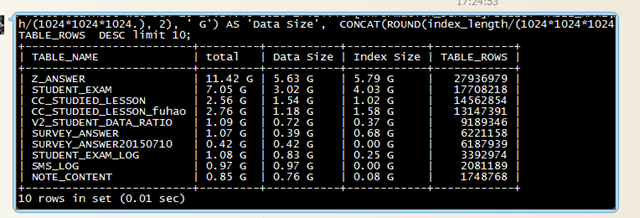
统计最大的表的语句:
SELECT TABLE_NAME, CONCAT(ROUND((data_length+index_length)/(1024*1024*1024), 2), ‘ G’) AS ‘total’ ,
CONCAT(ROUND(data_length/(1024*1024*1024.), 2), ‘ G’) AS ‘Data Size’,
CONCAT(ROUND(index_length/(1024*1024*1024), 2), ‘ G’) AS ‘Index Size’ ,
TABLE_ROWS
FROM `TABLES` WHERE TABLE_SCHEMA=’db_G2S_OnlineSchool’ ORDER BY TABLE_ROWS DESC limit 10;