参考文档URL:http://www.ibm.com/developerworks/cn/linux/l-cobbler/
安装epel源
rpm -ivh http://dl.fedoraproject.org/pub/epel/6/i386/epel-release-6-8.noarch.rpm
安装 cobbler 和 cobbler-web
yum -y install cobbler fence-agents cobbler-web
配置文件 (红色的是修改部分)
主要的 Cobbler 配置文件是 /etc/cobbler/settings。使用文本编辑器打开这个文件,并设置以下选项:
- manage_dhcp:1
- manage_dns:1
- manage_tftpd:1
- restart_dhcp:1
- restart_dns:1
- pxe_just_once:1
- next_server:<服务器的 IP 地址>
- server:<服务器的 IP 地址>
/etc/cobbler/dnsmasq.template (主要是指定dhcp相关)
read-ethers
addn-hosts = /var/lib/cobbler/cobbler_hosts
dhcp-range=192.168.10.1,192.168.20.254,255.255.0.0,192.168.0.19
dhcp-option=3,$next_server
dhcp-lease-max=600000
dhcp-authoritative
dhcp-boot=pxelinux.0
dhcp-boot=net:normalarch,pxelinux.0
dhcp-boot=net:ia64,$elilo
server=8.8.8.8
$insert_cobbler_system_definitions
vi /etc/cobbler/modules.conf (模块相关)
[root@pxe-test1 ~]# cat /etc/cobbler/modules.conf | grep -v “#”
[authentication]
module = authn_pam
[authorization]
module = authz_ownership
[dns]
module = manage_bind
[dhcp]
module = manage_dnsmasq
[tftpd]
module = manage_in_tftpd
修改/etc/cobbler/users.conf (web登陆相关)
[admins]
admin = “admin”
[root@localhost home]# useradd admin
[root@localhost home]# passwd admin
更改用户 admin 的密码 。
新的 密码:
无效的密码: 它没有包含足够的不同字符
无效的密码: 过于简单
重新输入新的 密码:
passwd: 所有的身份验证令牌已经成功更新。
[root@localhost home]#
添加admin 账号和密码
service cobblerd start
service httpd start
openssl passwd -1 -salt ‘random-phrase-here’ ‘ceshi123’
$1$random-p$aOwnan1tNacGA8GVU0ovJ.
加密字符串。
之前在hardlink 一直fail 查看日志才发现 /usr/sbin/hardlink 没有
请安装 yum -y install hardlink
centos 导入很简单,我后来又添加了esx4.1的网络安装
挂载
mount -t auto -o loop /root/VMWare-server-esx-4.1.0-260247.iso /mnt/
导入
cobbler import –path=/mnt –name=esx4.1 –arch=x86_64
即可,通过cobbler-web直接可以看到
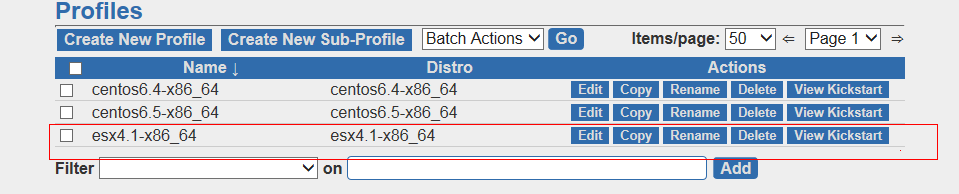
不过后续的测试esx4.1 还是安装不了,网卡有问题,网上看esxi5.1的版本是可以的。