参考url:http://theforeman.org/manuals/1.4/quickstart_guide.html
foreman是puppet管理相关。
安装
Red Hat Enterprise Linux 6 and derivatives (CentOS, Scientific Linux)
- EPEL is required
- On RHEL 6, additionally the Optional and RHSCL 1.0 repositories/channels:
yum-config-manager --enable rhel-6-server-optional-rpms rhel-server-rhscl-6-rpms
For Red Hat variants, run this (replace ‘el6’ with ‘f19’ if appropriate):
yum -y install http://yum.theforeman.org/releases/1.4/el6/x86_64/foreman-release.rpm yum -y install foreman-installer
Running the installer
foreman-installer默认的账号和密码:默认用户 admin; 默认密码 changeme
foreman 导入已有主机
[root@puppet ~]# foreman-rake puppet:import:hosts_and_facts
foreman 报错Error retrieving node redis71.test.com: Net::HTTPForbidden
[root@puppet conf.d]# /etc/puppet/node.rb redis71.test.com
— false
Error retrieving node redis71.test.com: Net::HTTPForbidden
查看错误日志
tail -f /var/log/foreman/production.log
No smart proxy server found on [“puppet.test.com”] and is not in trusted_puppetmaster_hosts
Redirected to https://puppet.test.com/users/login
Filter chain halted as :require_puppetmaster_or_login rendered or redirected
Completed 403 Forbidden in 107ms (ActiveRecord: 1.6ms)
参考官网:http://theforeman.org/manuals/1.2/
No smart proxy server found on $HOST indicates Foreman has no smart proxy registered for the source host, add it to the Smart Proxies page in Foreman. A common cause of this issue is the hostname in the URL doesn’t match the hostname seen here in the log file – change the registered proxy URL to match. If no smart proxy is available or can be installed, use trusted_puppetmaster_hosts and add this hostname to the whitelist.
发现hostname是不对的 。将hostname更改成 puppet.test.com ,然后重启解决问题。(其实后来发现没有解决问题)
后来发现以上解决方案不行,发现use trusted_puppetmaster_hosts and add this hostname to the whitelist.我在设置中发现有trusted_puppetmaster_hosts 添加个即可。
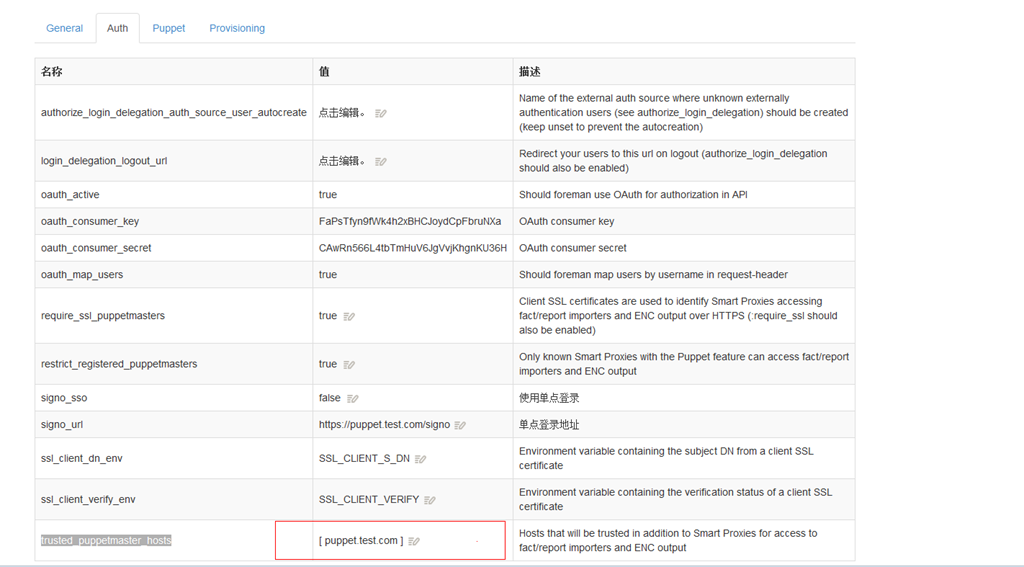
foreman 运行puppet 的问题
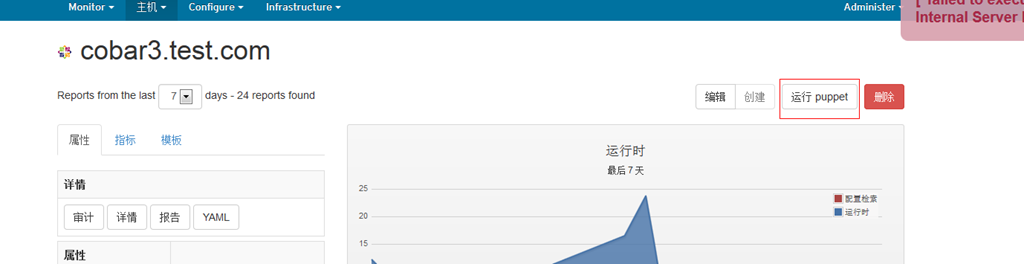
其实是通过 puppet kick 去实现客户端的更新。遇到一位高人NewpTone 的指点,说说我的理解吧。
puppet run (其实是puppet kick ) 与 mcollective的对比
以下是NewpTone 的解释。很贴切。
++++++++++++
puppet run也就是封装了puppet kick,是puppet 2.x版本中为了弥补没有编排工具,搞得一个特性
mcollective是后来出现的编程工具,支持多种cms工具,也包括puppet,
所以从3.x开始,puppet kick被标记为废弃,
因为Mcollective比puppet kick实现的功能更强大,独立出来作为一套Orchestration framework。
puppet kick对于mco来说,只是一个plugin而已
最新版本的foreman有一个插件支持mco plugin,
但是有bug,需要稍微改下那个插件的代码
你点foreman面板上的run puppet按钮,实际的执行是这样的: foreman -> foreman-proxy –> puppet
++++++++++++
先说下怎么实现 puppet kick 与 foreman 的整合吧。
相关url:http://www.cnblogs.com/yuxc/archive/2012/09/28/2706631.html
1.首先,需要在Foreman的setting中将puppetrun设为true

2.然后配置你的puppet agent节点,在puppet.conf里添加一行:
listen = true
3.配置auth.conf:
path /run
method save
allow *
path /
auth any
OK,开启puppet进程。点击Run puppet,执行完成。如果提示No proxy found,请点Edit然后点submit更新数据库,这是一个已知的Bug。
我在操作的时候遇到一个问题:
![UC{AF)J{2[M3~PQ6N$]G7CE](https://www.hmouse.cn/wp-content/uploads/2014/06/UCAFJ2M3PQ6NG7CE.jpg "UC{AF)J{2[M3~PQ6N$]G7CE")
其实后来发现hostname的问题,将hostname 换成 puppet.test.com 就好了。
还有一个问题就是很烦人的 puppet kick 的问题。

status is running
Host cobar3.test.com is already running
cobar3.test.com finished with exit code 3
后来在网上发现一个文章:http://www.51testing.com/html/00/130600-853955.html
14、puppet kick主动通知客户端提示错误号3
问题描述:
puppet kick执行一次后,再次执行,会提示错误号3。
# puppet kick -p 10 –host puppetclient1.com
Warning: Puppet kick is deprecated. See http://links.puppetlabs.com/puppet-kick-deprecation
Warning: Failed to load ruby LDAP library. LDAP functionality will not be available
Triggering puppetclient1.com
Getting status
status is running
Host puppetclient1.com is already running
puppetclient1.com finished with exit code 3
Failed: puppetclient1.com
这时客户端执行# puppet agent -t
Notice: Ignoring –listen on onetime run
Notice: Run of Puppet configuration client already in progress; skipping (/var/lib/puppet/state/agent_catalog_run.lock exists)
解决方法:
/var/lib/puppet/state/agent_catalog_run.lock存放的是puppet agent进程的pid
使用puppet agent –no-client方式进行启动,会生成该lock文件;
方法一:
rm -rf /var/lib/puppet/state/agent_catalog_run.lock
但此方法不方便,特别是在只使用puppet kick进行主动通知的部署方案中;
方法二:
更新ruby为2.0.0版本,facter/puppet也需要再重装次;
使用ruby2.0.0,多次执行puppet kick都是正常,不会生成该.lock文件;
具体原因不太清楚了,但实验结果是这样的。
只有方法二,才能解决,很麻烦,难道只能用mcollective?
foreman更改name的名称换成hostname
更改 node.rb 文件
hostname = puppet_facts[‘values’][‘fqdn’] || certname
{‘facts’ => puppet_facts[‘values’], ‘name’ => hostname, ‘certname’ => certname}
因为他是获取’fqdn’的值 赋值给hostname,再赋值给name
可以直接更改成
hostname = puppet_facts[‘values’][hostname] || certname
即可。测试name变成了hostname,然后域问题也可以不指定了。
foreman 的 mysql存储
之前看网上文档有很多误导了。以为foreman很渣。后来发现都是自己的问题。
建议去官网看:http://theforeman.org/manuals/1.1/index.html#3.5.3DatabaseSetup
里面说了
Edit your config/database.yml and modify:
production:
  adapter: mysql
  database: puppet
  username: puppet
  password: password
  host: localhost
  socket: "/var/run/mysqld/mysqld.sock"
If you use foreman 1.0 with foreman-mysql2 use ‘adapter: mysql2’ instead
其中要求你装mysql2 所以配置中 adapter: mysql 换成 adapter: mysql2
首先你要安装 yum -y install foreman-mysql*
安装完之后 访问页面 会有 gem install activerecord-mysql2-adapter 的提示。
我通过gem install activerecord-mysql2-adapter 安装了,并且通说gem list 也看到安装了,一直还是报gem install activerecord-mysql2-adapter 的错误,之前一直没想通,后来发现 我的环境是 ruby193 而不是ruby 。我尝试 scl enable ruby193 ‘gem install rails’ 然后通过 scl enable ruby193 ‘gem list’ 看到已安装。 重新登录页面发现没问题了。
PS: 网上有跟多用 rake db:migrate 初始化的 ,我的rake好像有问题,一直没初始化,但是通过页面访问可以直接初始化,很智能。
感悟:
1:一定要看环境,如果程序还是提示同样的错误,可能你的环境不对。
2:要多看官网文档,网上的文档可能有时会比较老,从而误导你。
PS 切换ruby
scl enable ruby193 bash