1.git clone 报错
Initialized empty Git repository in /home/git/myuni/.git/
error: The requested URL returned error: 401 Unauthorized while accessing http://git.zhihuishu.com/coder/myuni.git/info/refs
fatal: HTTP request failed
升级git即可
rpm -ivh rpmforge-release-0.5.3-1.el6.rf.x86_64.rpm
yum –enablerepo=rpmforge-extras install git
2.git 保存密码
- 解决“Git Windows或Linux客户端保存用户名与密码”的问题
在linux系统下如果没有名为“.netrc”的文件,直接创建一个即可:touch .netrc(命令)
.netrc文件内容示例1machine nb.tooqe.com2login linmaogan3password 123456最后再设置文件访问权限:
1chmod600 ~/.netrc在Windows系统中的设置方法:
1.对“我的电脑->右键->属性->高级->环境变量->Administrator 的用户变量->新建” 在Windows中添加一个HOME环境变量,值为%USERPROFILE%,如下图:
2. 在“开始》运行”中打开%Home%,新建一个名为“_netrc”的文件。
3. 用记事本打开_netrc文件,输入Git服务器名、用户名、密码,并保存。示例如下:
machine git.cnblogs.com
login cnblogs_user
password cnblogs_pwd
3.git的大小写问题
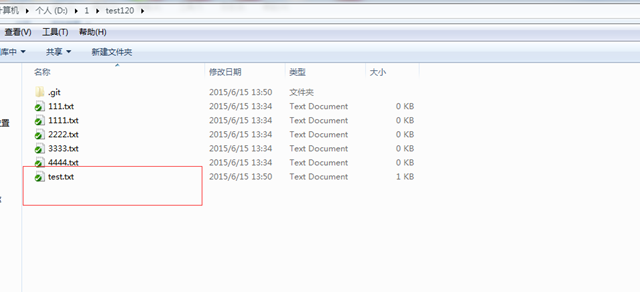
我用tortoisegit 测试文件上传的时候遇到个奇怪的问题,就是在修改文件的大小的时候,无法生效。譬如:
客户端是小写的:
服务器上还是原来的:
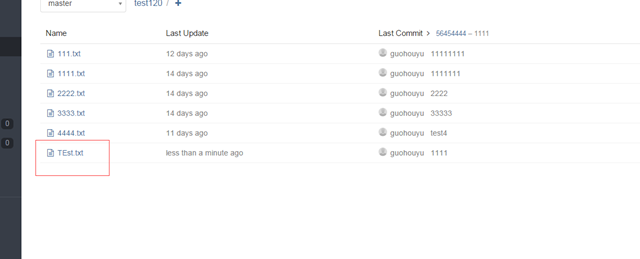
后来发现只能先删掉提交下,然后再上传在提交才能解决问题。
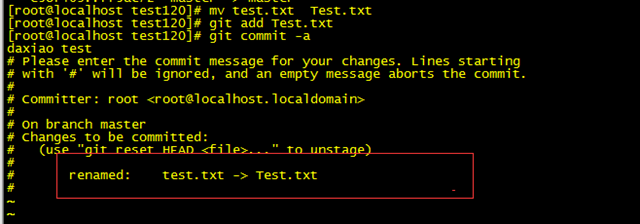
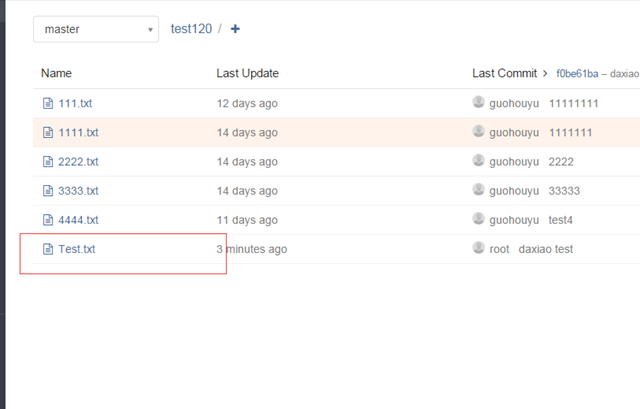
同时测试发现,在linux下是没这个问题的,可能是因为Windows不区分大小写造成的:
所以用Windows 时一定要小心啊。