mcollective安装
新的版本不支持stomp协议,坑死我了,看网上的大多数都是用stomp去连的。回来我被逼无奈,只能用activemq,然后通过activemq去连
参考url:http://kisspuppet.com/2013/11/10/mcollective-middleware/ (这个说的比较详细)
说说原理吧
1.3 工作原理图

看出来了其实东西 分成3个, client + 中间件+sever
中间件 activemq (其实 rabbitmq也可以,很多书都使用这个,但是我安装的版本是建议使用activemq )
安装
yum install tanukiwrapper activemq activemq-info-provider配置 (其实默认的不需要修改,最主要的就改下账号名和密码)
主要配置MCollective连接的端口以及账号、密码及权限
[root@puppetserver rpms]# vim /etc/activemq/activemq.xml … <simpleAuthenticationPlugin> <users> <!-- <authenticationUser username="${activemq.username}" password="${activemq.password}" groups="admins,everyone"/> --> #禁用 <authenticationUser username="mcollective" password="secret" groups="mcollective,admins,everyone"/> #配置通信的账号及密码 </users> </simpleAuthenticationPlugin> … <authorizationPlugin> #配置权限,默认即可 <map> <authorizationMap> <authorizationEntries> <authorizationEntry queue=">" write="admins" read="admins" admin="admins" /> <authorizationEntry topic=">" write="admins" read="admins" admin="admins" /> <authorizationEntry topic="mcollective.>" write="mcollective" read="mcollective" admin="mcollective" /> <authorizationEntry topic="mcollective.>" write="mcollective" read="mcollective" admin="mcollective" /> <authorizationEntry topic="ActiveMQ.Advisory.>" read="everyone" write="everyone" admin="everyone"/> </authorizationEntries> </authorizationMap> </map> </authorizationPlugin> … <transportConnectors> <transportConnector name="openwire" uri="tcp://0.0.0.0:61616"/> <transportConnector name="stomp+nio" uri="stomp://0.0.0.0:61613"/> #配置通信协议为stomp,监听61613端口 </transportConnectors>
启动
[root@puppetserver rpms]# /etc/rc.d/init.d/activemq start
Starting ActiveMQ Broker...
[root@puppetserver rpms]# chkconfig activemq on
[root@puppetserver rpms]# netstat -nlatp | grep 61613  #查看监听端口
tcp        0      0 :::61613                    :::*                        LISTEN      33805/java
安装mcollective
mcollective sever
yum install mcollective mcollective-common配置
[root@cobar3 ~]# cat /etc/mcollective/server.cfg
main_collective = mcollective
collectives = mcollective
libdir = /usr/libexec/mcollective
logfile = /var/log/mcollective.log
loglevel = info
daemonize = 1
# Plugins
securityprovider = psk
plugin.psk = 123456 #跟客户端一样
connector = activemq
plugin.activemq.pool.size = 1
plugin.activemq.pool.1.host = 192.168.3.11 #activemq服务器ip
plugin.activemq.pool.1.port = 61613
plugin.activemq.pool.1.user = mcollective #账号
plugin.activemq.pool.1.password = secret #密码
#connector = stomp
#plugin.stomp.host = 192.168.3.11
#plugin.stomp.port = 61613
#plugin.stomp.user = mcollective
#plugin.stomp.password = secret
plugin.puppet.command = puppet agent #这是mcollective-puppet-agent推荐添加的,具体没加我也没测,有什么问题
plugin.puppet.splay = true
plugin.puppet.splaylimit = 30
plugin.puppet.config = /etc/puppet/puppet.conf
plugin.puppet.resource_allow_managed_resources = true
# Facts
factsource = yaml
plugin.yaml = /etc/mcollective/facts.yaml
mcollective client
安装
[root@puppetserver rpms]# yum install mcollective-common mcollective-client配置
[root@puppet hostname]# cat /etc/mcollective/client.cfg
main_collective = mcollective
collectives = mcollective
libdir = /usr/libexec/mcollective
logger_type = console
loglevel = warn
# Plugins
securityprovider = psk
plugin.psk = 123456
connector = activemq
plugin.activemq.pool.size = 1
plugin.activemq.pool.1.host = 192.168.3.11
plugin.activemq.pool.1.port = 61613
plugin.activemq.pool.1.user = mcollective
plugin.activemq.pool.1.password = secret
#connector = stomp
#plugin.stomp.host = 192.168.3.11
#plugin.stomp.port = 61613
#plugin.stomp.user = mcollective
#plugin.stomp.password = secret
plugin.puppet.command = puppet agent
plugin.puppet.splay = true
plugin.puppet.splaylimit = 30
plugin.puppet.config = /etc/puppet/puppet.conf
plugin.puppet.resource_allow_managed_resources = true
# Facts
factsource = yaml
plugin.yaml = /etc/mcollective/facts.yaml
其实跟服务器配置一样即可
启动服务 测试Mcollective与Middleware通信
[root@puppetserver rpms]# mco ping  #检查所有存活的节点
agent2.kisspuppet.com                       time=119.98 ms
agent1.kisspuppet.com                       time=159.31 ms
---- ping statistics ----
2 replies max: 159.31 min: 119.98 avg: 139.64
[root@puppetserver rpms]# mco find
agent1.kisspuppet.com
agent2.kisspuppet.com
Mcollective插件的安装及测试
因为mcollective 只是个框架,还需要安装plugin
我主要要用 mcollective-puppet-agent 和 facter
先说mcollective-puppet-agent
官网文档:https://github.com/puppetlabs/mcollective-puppet-agent
mcollective客户端和服务端要安装
yum install mcollective-puppet-agent mcollective-puppet-common yum install mcollective-puppet-client mcollective-puppet-common载入Agent插件
[root@puppetserver rpms]# mco  #客户端默认在自动载入
The Marionette Collective version 2.2.4
usage: /usr/bin/mco command <options>
Known commands:
   completion           facts                find
   help                 inventory            ping
   plugin               puppet               rpc
Type '/usr/bin/mco help' for a detailed list of commands and '/usr/bin/mco help command'
to get detailed help for a command
[root@agent1 ~]# /etc/rc.d/init.d/mcollective restart
Shutting down mcollective:                                 [  OK  ]
Starting mcollective:                                      [  OK  ]
验证Agent插件是否被载入
[root@puppetserver rpms]# mco inventory agent1.kisspuppet.com #查看节点agent1是否已经载入puppet插件
Inventory for agent1.kisspuppet.com:
   Server Statistics:
                      Version: 2.2.4
                   Start Time: Thu Oct 03 16:09:03 +0800 2013
                  Config File: /etc/mcollective/server.cfg
                  Collectives: mcollective
              Main Collective: mcollective
                   Process ID: 8902
               Total Messages: 3
      Messages Passed Filters: 3
            Messages Filtered: 0
             Expired Messages: 0
                 Replies Sent: 2
         Total Processor Time: 0.46 seconds
                  System Time: 0.12 seconds
   Agents:
      discovery       puppet          rpcutil
   Data Plugins:
      agent           fstat           puppet   #已经载入puppet插件
      resource
   Configuration Management Classes:
      No classes applied
   Facts:
      mcollective => 1
记得如果Agents: 里面没有puppet 会报 No request sent, we did not discover any nodes.
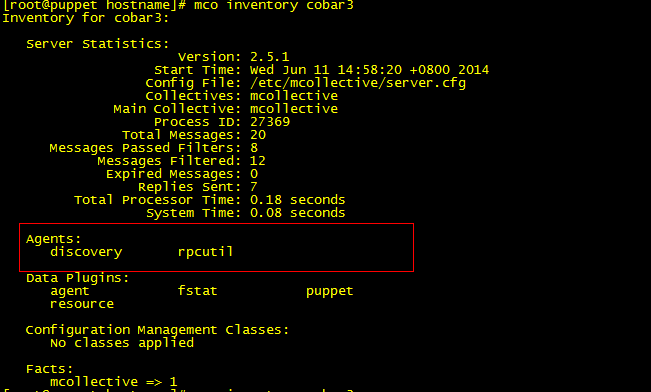
会报错

这个我在测试的时候,解决了很久。
从MCollective中运行Puppet
在运行命令之前,可以在节点查看puppet日志和puppetd服务的启停来判断命令是否调用了puppetd进程。
[root@puppetserver ~]# mco puppet  --noop --verbose status #查看节点agent守护进程状态
Discovering hosts using the mc method for 2 second(s) .... 2
 * [ ============================================================> ] 2 / 2
   agent2.kisspuppet.com: Currently stopped; last completed run 9 hours 35 minutes 36 seconds ago
   agent1.kisspuppet.com: Currently stopped; last completed run 9 hours 35 minutes 34 seconds ago
Summary of Applying:
   false = 2
Summary of Daemon Running:
   stopped = 2
Summary of Enabled:
   enabled = 2
[root@puppetserver rpms]# mco puppet -v runonce
Discovering hosts using the mc method for 2 second(s) .... 2
 * [ ============================================================> ] 2 / 2
agent1.kisspuppet.com                      : OK
    {:summary=>      "Started a background Puppet run using the 'puppet agent --onetime --daemonize --color=false --splay --splaylimit 30' command"}
agent2.kisspuppet.com                      : OK
    {:summary=>      "Started a background Puppet run using the 'puppet agent --onetime --daemonize --color=false --splay --splaylimit 30' command"}
---- rpc stats ----
           Nodes: 2 / 2
     Pass / Fail: 2 / 0
      Start Time: Thu Oct 03 16:12:03 +0800 2013
  Discovery Time: 2007.23ms
      Agent Time: 3591.72ms
      Total Time: 5598.94ms
备注:当使用MCollective运行Puppet时,要求在所有被管理的节点上Puppet agent守护进程都需要被关闭。在每次使用mco puppet -v runonce命令调用puppetd agent时,MCollective都会产生一个新的Puppet进程。这个进程会和任何已经运行的Puppet agent守护进程产生功能性的重复。
当Puppet使用--runonce参数运行时,agent会在后台运行。所以虽然MCollective成功运行了Puppet,但实际上的Puppet agent运行可能http://kisspuppet.com/2013/11/10/my-fact/并不成功。需要查看Puppet报告来确定每一个Puppet agent运行的结果。MCollective返回的OK值表示MCollective服务器成功地启动了puppetd进程并且没有得到任何输出。
安装facter插件
[root@agent1 ~]# yum install mcollective-facter-facts [root@agent1 rpms]# ll /usr/libexec/mcollective/mcollective/facts/ total 12 -rw-r--r-- 1 root root 422 Feb 21 2013 facter_facts.ddl -rw-r--r-- 1 root root 945 Feb 21 2013 facter_facts.rb -rw-r--r-- 1 root root 1530 May 21 01:34 yaml_facts.rb
[root@agent1 ~]# vim /etc/mcollective/server.cfg … # Facts #factsource = yaml #注释掉 factsource = facter plugin.yaml = /etc/mcollective/facts.yaml [root@agent1 rpms]# /etc/rc.d/init.d/mcollective restart Shutting down mcollective: [ OK ] Starting mcollective: [ OK ]
[root@puppetserver rpms]# mco inventory agent1.kisspuppet.com #查看节点agent1是否加载了facts插件
Inventory for agent1.kisspuppet.com:
   Server Statistics:
                      Version: 2.2.4
                   Start Time: Thu Oct 03 16:31:47 +0800 2013
                  Config File: /etc/mcollective/server.cfg
                  Collectives: mcollective
              Main Collective: mcollective
                   Process ID: 9485
               Total Messages: 37
      Messages Passed Filters: 33
            Messages Filtered: 4
             Expired Messages: 0
                 Replies Sent: 32
         Total Processor Time: 0.74 seconds
                  System Time: 0.21 seconds
   Agents:
      discovery       puppet          rpcutil
   Data Plugins:
      agent           fstat           puppet
      resource
   Configuration Management Classes:
      No classes applied
   Facts:  #可以看到获取的节点facter信息(获取信息需要一些等待时间)
      architecture => x86_64
      augeasversion => 0.10.0
      bios_release_date => 07/02/2012
      bios_vendor => Phoenix Technologies LTD
      bios_version => 6.00
      blockdevice_fd0_size => 4096
     …
      uptime_days => 0
      uptime_hours => 20
      uptime_seconds => 74506
      uuid => 564DFBAB-CADC-FC69-36CA-955BFDB30F43
      virtual => vmware
[root@puppetserver rpms]# mco facts lsbdistdescription -v  #使用mco facts命令对操作系统类型进行显示
Discovering hosts using the mc method for 2 second(s) .... 2
Report for fact: lsbdistdescription
        Red Hat Enterprise Linux Server release 5.7 (Tikanga)found 1 times
            agent2.kisspuppet.com
        Red Hat Enterprise Linux Server release 5.8 (Tikanga)found 1 times
            agent1.kisspuppet.com
---- rpc stats ----
           Nodes: 2 / 2
     Pass / Fail: 2 / 0
      Start Time: Thu Oct 03 16:59:04 +0800 2013
  Discovery Time: 2004.83ms
      Agent Time: 67.32ms
      Total Time: 2072.15ms
root@puppetserver rpms]# mco facts lsbdistdescription #使用mco facts命令对操作系统类型进行统计 Report for fact: lsbdistdescription Red Hat Enterprise Linux Server release 5.7 (Tikanga)found 1 times Red Hat Enterprise Linux Server release 5.8 (Tikanga)found 1 times Finished processing 2 / 2 hosts in 79.15 ms [root@puppetserver rpms]# mco facts -v --with-fact hostname='agent1' memoryfree #查看主机agent1的剩余内存 Discovering hosts using the mc method for 2 second(s) .... 1 Report for fact: memoryfree 795.13 MB found 1 times agent1.kisspuppet.com ---- rpc stats ---- Nodes: 1 / 1 Pass / Fail: 1 / 0 Start Time: Thu Oct 03 17:02:13 +0800 2013 Discovery Time: 2005.65ms Agent Time: 49.37ms Total Time: 2055.03ms
使用元数据定位主机
4.3.1 使用默认facter元数据定位主机
4.3.1.1 触发所有系统为RedHat,版本为5.7的所有节点puppetd守护进程
[root@puppetserver rpms]# mco puppet -v runonce   rpc --np -F  operatingsystemrelease='5.7' -F operatingsystem='RedHat'
Discovering hosts using the mc method for 2 second(s) .... 1
agent2.kisspuppet.com                      : OK
    {:summary=>      "Started a background Puppet run using the 'puppet agent --onetime --daemonize --color=false --splay --splaylimit 30' command"}
---- rpc stats ----
           Nodes: 1 / 1
     Pass / Fail: 1 / 0
      Start Time: Thu Oct 03 17:03:56 +0800 2013
  Discovery Time: 2008.09ms
      Agent Time: 1187.69ms
      Total Time: 3195.78ms
4.3.1.2 触发所有系统为RedHat,kernel版本为2.6.18的所有节点puppetd守护进程
[root@puppetserver rpms]# mco puppet -v runonce   rpc --np -F  kernelversion='2.6.18'  -F operatingsystem='RedHat'
Discovering hosts using the mc method for 2 second(s) .... 2
agent2.kisspuppet.com                      : OK
    {:summary=>      "Started a background Puppet run using the 'puppet agent --onetime --daemonize --color=false --splay --splaylimit 30' command"}
agent1.kisspuppet.com                      : OK
    {:summary=>      "Started a background Puppet run using the 'puppet agent --onetime --daemonize --color=false --splay --splaylimit 30' command"}
---- rpc stats ----
           Nodes: 2 / 2
     Pass / Fail: 2 / 0
      Start Time: Thu Oct 03 17:06:15 +0800 2013
  Discovery Time: 2004.32ms
      Agent Time: 1308.34ms
      Total Time: 3312.66ms
4.3.2 使用自定义facter元数据定位主机
备注:使用自定义facter元数据可以更加灵活的定位主机,如何定义fact可参考博文《通过自定义fact增强MCollective推送更新元数据的灵活性》
4.3.2.1 在agent1上定义facter my_apply1和my_apply2
[root@agent1 mcollective]# facter -p | grep my_apply
my_apply1 => apache
my_apply2 => mysql
4.3.2.2 在agent2上定义facter my_apply2和my_apply3
[root@agent2 mcollective]# facter -p | grep my_apply
my_apply2 => mysql
my_apply3 => php
4.3.2.3 在MCollective客户端测试节点自定义facter是否正确
[root@puppetserver facter]# mco inventory agent1.kisspuppet.com  | grep my_apply
      my_apply1 => apache
      my_apply2 => mysql
[root@puppetserver facter]# mco inventory agent2.kisspuppet.com  | grep my_apply
      my_apply2 => mysql
      my_apply3 => php
4.3.2.4 通过自定义facter定位主机触发更新
[root@puppetserver facter]# mco puppet -v runonce  mco facts -v --with-fact  my_apply3='php' #筛选节点facter变量my_apply3=php的主机进行触发puppetd守护进程
Discovering hosts using the mc method for 2 second(s) .... 1
 * [ ============================================================> ] 1 / 1
agent2.kisspuppet.com                      : OK
    {:summary=>      "Started a background Puppet run using the 'puppet agent --onetime --daemonize --color=false --splay --splaylimit 30' command"}
---- rpc stats ----
           Nodes: 1 / 1
     Pass / Fail: 1 / 0
      Start Time: Thu Oct 03 23:33:54 +0800 2013
  Discovery Time: 2005.35ms
      Agent Time: 1078.86ms
      Total Time: 3084.21ms