参考url:https://blog.yuzunzhi.com/es5-2-%E9%9B%86%E7%BE%A4%E7%AE%80%E5%8D%95%E4%BC%98%E5%8C%96/
以前在部署es5的时候发现配置文件有更改,无法在配置文件指定默认的number_of_shards。后来在查阅文档的时候发现,es5对_template的默认number_of_shard只能通过http控制端口去指定。由于我设置的模板是logstash-*,所以默认也是修改这个模板。
1:最好安装es-head,方便操纵。
2:去es-head的复合查询。查询所需要的模板http://192.168.0.100:10004/_template/logstash/的信息。
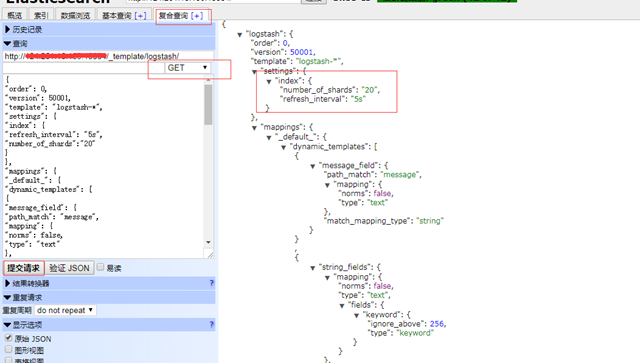
其实这之前是没有 “number_of_shards”: “20”, 这一行的。
3:修改配置并put上去。由于用es-head很简单,把刚才查到的信息,放在左侧的请求里,并把”number_of_shards”: “20”, 加进去,然后验证下json,PUT上去就可以。注意的是:截取的logstash后面的json字段。
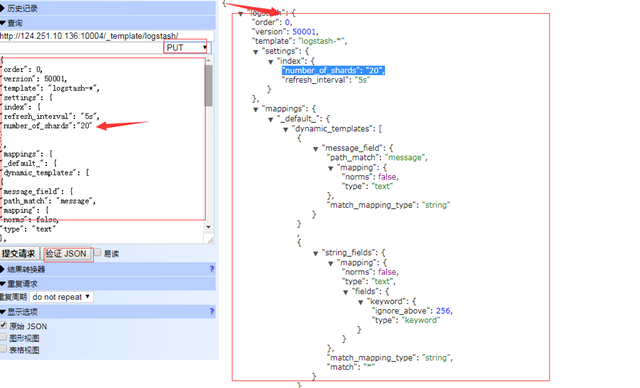
然后在获取下,发现设置都被更改了。然后删除下index,在重新生成下就好了。
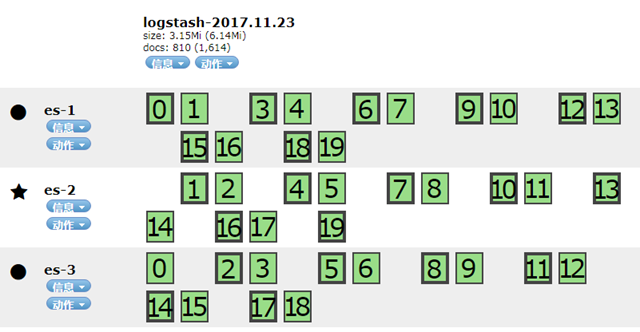
当然,也可以根据参考url直接通过http去操作,无需es-head。也是可以的。
参考配置:
{“order”:0,”version”:50001,”template”:”logstash-*”,”settings”:{“index”:{“refresh_interval”:”5s”,”number_of_shards”:”20″}},”mappings”:{“_default_”:{“dynamic_templates”:[{“message_field”:{“path_match”:”message”,”mapping”:{“norms”:false,”type”:”text”},”match_mapping_type”:”string”}},{“string_fields”:{“mapping”:{“norms”:false,”type”:”text”,”fields”:{“keyword”:{“ignore_above”:256,”type”:”keyword”}}},”match_mapping_type”:”string”,”match”:”*”}}],”_all”:{“norms”:false,”enabled”:true},”properties”:{“@timestamp”:{“include_in_all”:false,”type”:”date”},”geoip”:{“dynamic”:true,”properties”:{“ip”:{“type”:”ip”},”latitude”:{“type”:”half_float”},”location”:{“type”:”geo_point”},”longitude”:{“type”:”half_float”}}},”@version”:{“include_in_all”:false,”type”:”keyword”}}}},”aliases”:{}}