最近研究elasticsearch,其实是filebeat+logstah+es+kinbana+hdfs集群,发现了很多的坑,譬如时区问题,字段问题,写入hdfs问题,等等。现在做下总结,方便以后查阅:
1,时区问题:
默认解析时间是UTC0,其实用es没啥问题,但是hdfs采集的时候需要争取的时间,所以要对时间进行处理,调换到UTC+8,配置如下(规则一般都是在filter里面添加):
date{
match=>[“tmstp”, “UNIX_MS”]
target=>”@timestamp”
}
ruby {
code => “event.set(‘timestamp’, event.get(‘@timestamp’).time.localtime + 8*60*60)”
}
这样’timestamp’获取的时间就是正确8时区的时间。
如果想把@timestamp 也换掉,就可以替换掉:
ruby {
code => “event.set(‘@timestamp’,event.get(‘timestamp’))”
}
由于我不希望@timestamp 设置成8时区,但是又想要正确的时间路径,所以自行设置了变量:
date{
match=>[“tmstp”, “UNIX_MS”]
target=>”@timestamp”
}
ruby {
code => “event.set(‘timestamp’, event.get(‘@timestamp’).time.localtime + 8*60*60)”
}
ruby {
code => “event.set(‘timestamp1’, event.get(‘@timestamp’))”
}
ruby {
code => “event.set(‘@timestamp’,event.get(‘timestamp’))”
}
mutate {
add_field => {
“datapath”=>”%{+yy-MM}/%{+dd}/%{+HH}”
“service_type” => “%{service_type1[6]}_access”
}
}
ruby {
code => “event.set(‘@timestamp’, event.get(‘timestamp1’))”
}
mutate {
remove_field => [“service_type1″,”timestamp1″,”timestamp”]
}
以上就满足hdfs获取的写入路径是北京时间的格式,@timestamp还是UTC的0时区。
2:json处理
由于我们的日志格式是:
2018-01-04 12:17:59,872 AM GMT+08:00 INFO – {“p”:”SP”,”ser”:3,”tmstp”:1514996279872,”serip”:”172.23.89.7″,”logtp”:2,”fip”:”/172.23.89.5:58111″}
需要对数据进行处理截取{}作为json格式,前面都需要丢弃。
需要自定义规则,跟之前的nginx日志一样:
[root@emr-worker-1 logstash-6.1.1]# cat vendor/bundle/jruby/2.3.0/gems/logstash-patterns-core-4.1.2/patterns/chat
CHATLOG \{(.*)\}
定义了CHATLOG 格式日志。
grok {
match => { “message” => “%{CHATLOG:chatlog}” }
}
这样就对message做了json截取。然后解析下
json {
source => “chatlog”
}
这样就变成了纯json格式的日志。
2:写入hdfs的问题
写入经常冲突,后来发现应该每个logstash写入到hdfs最好不是同一个文件,
output {
# stdout { codec => rubydebug }
if [p] {
webhdfs {
host => [“172.23.89.33”]
port => 50070
path => “/liaobei/logdata/%{service_type}/%{datapath}/data01-access.log”
user => “hadoop”
compression => “snappy”
codec => line {format => “%{chatlog}”}
}
}
}
最好抛出掉json异常(个人觉得这个其实没用)
if “_jsonparsefailure” in [tags] {
drop { }
}
不过后面其实发现是因为我补充的日志,没对service_type做说明,造成service_type没办法获取,才造成的hdfs的写入报错。这点也要注意,因为补充日志的时候,我随便弄个文件,造成了路径获取错误,造成了service_type没办法获取。
mutate {
add_field=>{“service_type1″=>”%{source}”}
}
mutate {
split => [“service_type1” , “/”]
}
mutate {
add_field => {
“datapath”=>”%{+yy-MM}/%{+dd}/%{+HH}”
“service_type” => “%{service_type1[6]}_access”
}
}
所以之后的php一直没报错,PHP是因为service_type写死的,所以补充日志也写死了。所以没有报错。只有chat的日志报错。
当然由于后面没有时间验证,就没做重现。大概就是这个问题。
3:kafka和es的坑
kafka主要是 php那边有大的日志写入,会报The request included a message larger than the max message size the server will accept。这个不算坑,只能说我们的日志实在是太大了,不合理。
修改配置
message.max.bytes=10240000
fetch.message.max.bytes=10240000
让kafka接受的消息更大。
es的话,是一个index的识别创建有问题。原因还没查明,估计是程序的BUG。我发现es5.5和6.1都有这个报错。
报错如下:
[2018-01-04T14:15:24,625][WARN ][logstash.outputs.elasticsearch] Could not index event to Elasticsearch. {:status=>400, :action=>[“index”, {:_id=>nil, :_index=>”logstash-2018.01.04″, :_type=>”chat_log”, :_routing=>nil}, #<LogStash::Event:0x44960714>], :response=>{“index”=>{“_index”=>”logstash-2018.01.04”, “_type”=>”chat_log”, “_id”=>”AWC_z1Sxlwnz255tEaZZ”, “status”=>400, “error”=>{“type”=>”mapper_parsing_exception”, “reason”=>”failed to parse [verbose]”, “caused_by”=>{“type”=>”illegal_state_exception”, “reason”=>”Can’t get text on a START_OBJECT at 1:174”}}}}}
是说verbose无法json解析(failed to parse [verbose])。但是flume传过来的都是json格式,而且有的更加复杂的json格式都没报错,我当时怀疑是不是verbose字段的问题。所以我更换了名字变成php_verbose。就不再报错。本来怀疑是不是历史创建的索引有问题,但是尝试过删除所有的数据和索引,即使没有verbose的index,也一样报错。我也怀疑版本问题,但是升级logstash 和 es都无法解决问题。目前推测就是 这个字段是系统的字段,有特殊处理。以前遇到过类似情况,譬如@timestamp。后面有空可以查下,目前就是更换字段,就不再报错。
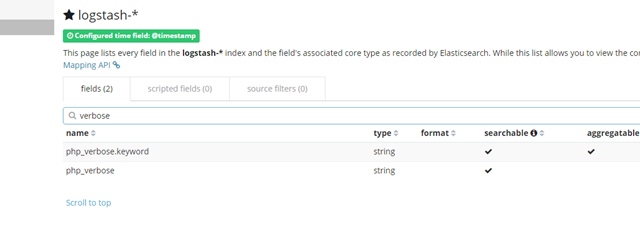
if [verbose] {
mutate {
add_field => { “php_verbose”=>”%{verbose}” }
remove_field => [“verbose”]
}
}
由于chat日志没有verbose字段,所以在改名之前,还做了字段存在判断。